
Recommended Services
Supported Scripts
AI Automation · Manchester
AI automation for access requests.
Retain the manual fallback.
An automated workflow can collect a request and prepare the administrative step. Access changes should follow the organisation’s permission and approval rules. Keep the manual fallback available while the automated process is evaluated.

Choose the task.
Then choose the technology.
We design around the systems you already use and keep the scope of each automation explicit.




Start with a manageable workflow.

AI Chatbot Development
We define what the assistant may answer, what it must not infer and how enquiries reach your team.
Machine Learning
We look at data quality and the decision you need to make before recommending an analytical approach.


ChatGPT Integrations
We scope the assistant’s inputs, allowed actions and review steps rather than treating generated text as automatically correct.
AI Workflow Automation
We document the repeated steps and identify where a dependable system connection can replace manual copying.

A practical comparison
with the manual process.
We establish a starting point and agree what will be measured before the automation is released.
Execution time
Track the full process duration rather than the speed of one isolated automated step.
Manual steps
Check which manual steps have actually been removed from the workflow.
Errors
Review the cases that need correction, not only the successful runs.
Workflow completion
Measure completed outcomes and the review effort needed to achieve them.
A PRACTICAL STARTING POINT
Replace a repetitive task with a measured first workflow.
Choose a bounded manual process and compare its time, error rate and review effort with the automated version. Include maintenance in the decision to expand it.
01 · Prepare
Identify what already works, where people get stuck and which URLs or records must survive the change.
02 · Verify
Compare the old and new journey using the same tasks. Check retained information and the transition path.
03 · Keep ownership clear
Keep a record of changed behaviour, the people affected and the process for subsequent corrections.
Illustrative sequence. The actual configuration and responsibilities follow the agreed requirements.
DELIVERY & OWNERSHIP
Plan the change around what is already in use.
Identify the live users, active records and dependencies that must keep working. Agree when a change can take place and how new activity will be handled during the transition.
01 · Prepare
Keep the manual fallback available while the automated process is evaluated.
02 · Verify
Compare the automated output with the manual result and test the fallback when a workflow step fails.
03 · Keep ownership clear
Retain the manual route during evaluation and assign ownership of exceptions and incomplete runs.
OUR WORK
Connected workflows in practice.
Examples of organised data and system integration.

PlegmaHost
A corporate website connected to WHMCS
We developed a WordPress website linked to WHMCS, organising package information, registration and service management into one customer journey.
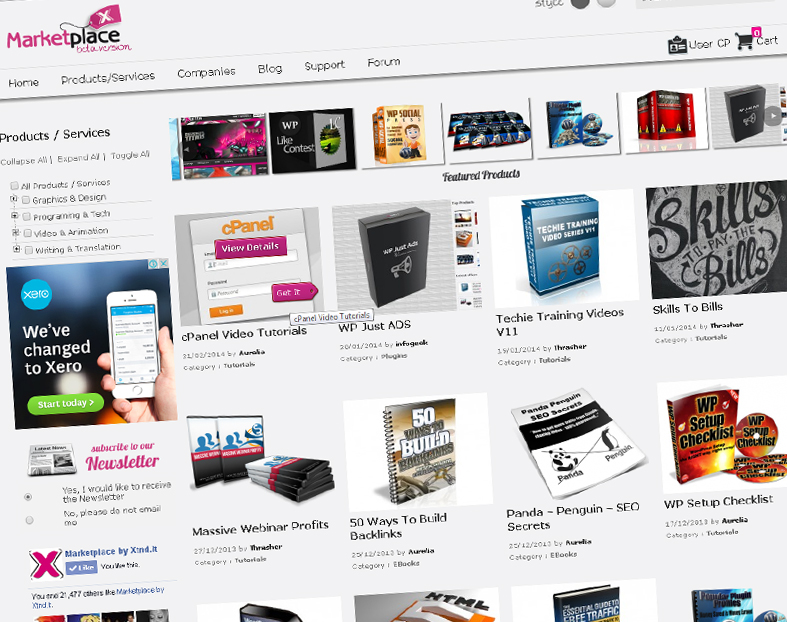
XTND Marketplace
A multi-vendor digital marketplace
We built a WordPress marketplace for creators’ digital products, including listings, categories, reviews and purchasing through a shared platform.
CONNECTED SYSTEMS AND TECHNICAL SUPPORT — CLIENT FEEDBACK
“They always deliver and are very creative with web design/development. They are absolute masters of WordPress. They have also been great with dealing with a large number of stakeholders within business.”
Joel K. · Jim’s Group
SERVICE AREA
For your audience in Manchester.
Member journeys.
A team serving Manchester may collaborate from more than one place. Agree who supplies information and who approves changes without assuming everyone shares an office or schedule.
Identify who approves outputs and who can change prompts, tools or permissions.
The map identifies the audience area. Project scope, collaboration and delivery are agreed around the business and its users; it does not imply a local office.
- Field mapping
- Access and duplicate checks
- Ambiguous inputs
Manchester
Which process should we examine first?
Tell us what your team does manually, which systems are involved and where the delays occur. We will discuss a realistic first scope.

PRACTICAL QUESTIONS
Before we agree the next step.
Questions about the work, the checks and the handover.
Use execution records and explicit completion or failure states. A generated answer alone does not prove that an external action succeeded. Verify the relevant system response.
Only within an explicitly authorised and validated process. A practical initial design often prepares the request for a person to approve rather than allowing the model to decide access.
Use defined booking rules and the authoritative system for availability. AI may assist with language or classification, but exceptions and consequential changes need agreed controls.
YOUR NEXT STEP
Automate booking follow-up within agreed rules.
Show us the current service and what must continue working. We can discuss a controlled transition rather than an isolated replacement.
Keep the manual fallback available while the automated process is evaluated.