
Recommended Services
Supported Scripts
AI Automation · Utrecht
AI automation for enquiry routing.
Plan volume and review.
Automation can classify an incoming request and prepare a suggested next step. Define which decisions need a person before information is sent or a record is changed. Check execution limits, queues and review capacity when input volume increases.

Choose the task.
Then choose the technology.
We design around the systems you already use and keep the scope of each automation explicit.



Automate a specific bottleneck first.

AI Chatbot Development
We define what the assistant may answer, what it must not infer and how enquiries reach your team.
Machine Learning
Pattern analysis and forecasting require suitable data and a defined business question. We assess both before proposing a model.


ChatGPT Integrations
Language models can assist with retrieval, drafting and enquiry routing when source material and review responsibilities are clear.
AI Workflow Automation
We document the repeated steps and identify where a dependable system connection can replace manual copying.

A practical comparison
with the manual process.
We establish a starting point and agree what will be measured before the automation is released.
Execution time
Compare the time needed to complete the task, including approvals and corrections.
Manual steps
Count the entries and repetitive actions that still need a person.
Errors
Review the cases that need correction, not only the successful runs.
Workflow completion
Measure completed outcomes and the review effort needed to achieve them.
A PRACTICAL STARTING POINT
Connect tools with traceable workflow steps.
An automation should make the source, action and outcome visible. Plan authentication, retries and the review of failed runs alongside the model prompt.
01 · Prepare
List the systems involved, the records they exchange and which system owns each field.
02 · Verify
Check a successful transfer, a rejected input and a repeated submission. Confirm that failures can be found and reviewed.
03 · Keep ownership clear
Keep access ownership, change records and an agreed contact for failures between the systems.
Illustrative sequence. The actual configuration and responsibilities follow the agreed requirements.
DELIVERY & OWNERSHIP
Confirm the dependency before building around it.
Identify the provider, available access and the functions the external service actually supports. Include licence or usage restrictions that could affect the proposed work.
01 · Prepare
Confirm tool access, model limitations and the external system’s actual response.
02 · Verify
Verify the connected tool’s response, including a rejected action, timeout or duplicate request.
03 · Keep ownership clear
Document integration credentials and the owner who reviews retries or external-provider failures.
OUR WORK
Connected workflows in practice.
Examples of organised data and system integration.

Jim’s Group
WordPress, bookings and connected systems
We developed a WordPress booking platform connected to the group’s management system, an Angular application for monitoring requests and a shared foundation for individual division websites.
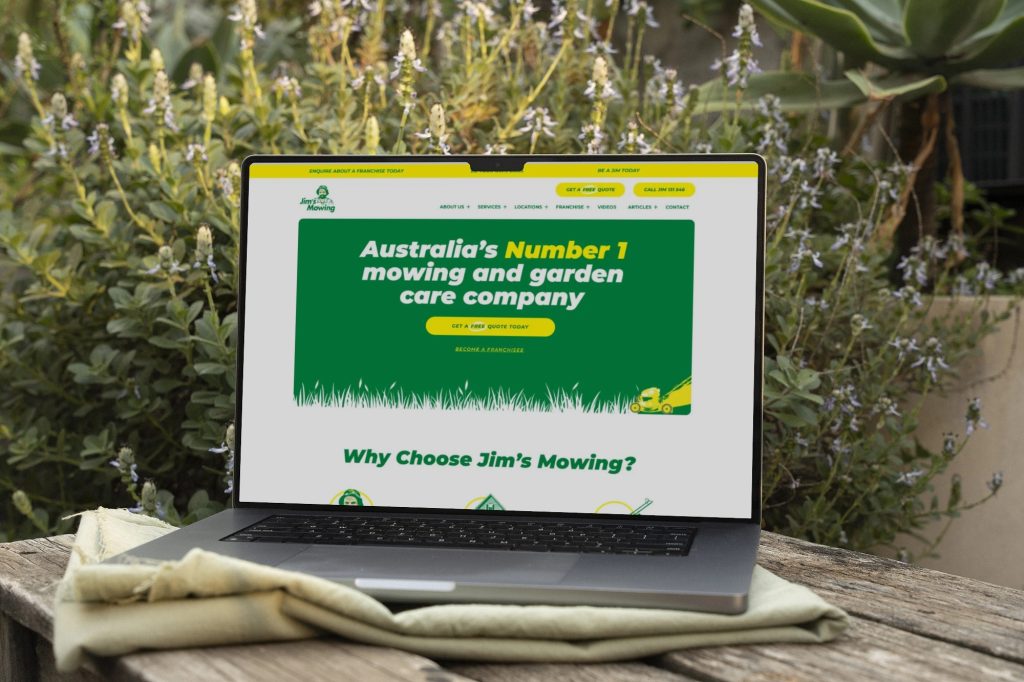
Jim’s Mowing
A business website with custom location tools
We developed the corporate website and a WordPress extension for presenting service areas, organising a large collection of local services within one manageable structure.
CONNECTED SYSTEMS AND TECHNICAL SUPPORT — CLIENT FEEDBACK
“They always deliver and are very creative with web design/development. They are absolute masters of WordPress. They have also been great with dealing with a large number of stakeholders within business.”
Joel K. · Jim’s Group
SERVICE AREA
For your audience in Utrecht.
Products and catalogues.
Serving Utrecht can involve customers with different usage patterns. Describe when and how the audience uses the service rather than assuming the city name predicts demand.
Check execution limits, queues and review capacity when input volume increases.
The map identifies the audience area. Project scope, collaboration and delivery are agreed around the business and its users; it does not imply a local office.
- Decision and source data
- Missing or late records
- Review of generated commentary
Utrecht
Which process should we examine first?
Share a recurring task and the tools it passes through. We will review whether automation is appropriate before proposing a solution.

PRACTICAL QUESTIONS
Before we agree the next step.
Questions about the work, the checks and the handover.
Use defined booking rules and the authoritative system for availability. AI may assist with language or classification, but exceptions and consequential changes need agreed controls.
That is not a safe default for every business. Start with classification or draft replies, define exceptions and require approval for actions with meaningful customer or business consequences.
Only within an explicitly authorised and validated process. A practical initial design often prepares the request for a person to approve rather than allowing the model to decide access.
YOUR NEXT STEP
Connect tools with traceable workflow steps.
Describe the information the service will handle and any known requirements. We can identify the technical decisions and the additional review needed.
Limit the information sent to a model or connected tool to the authorised task.