
Recommended Services
Supported Scripts
Web Design · Birmingham
Web design for clear enquiries.
Plan the campaign journey.
Design the information and navigation around a useful enquiry. The layout should make the service, its evidence and the contact route easy to understand. Check campaign landing pages and mobile journeys before an announced launch.
- Business websites and redesigns
- Designed for mobile, tablet and desktop
- Content and structure you can manage

MORE THAN A GOOD-LOOKING SCREEN
Make the offer easy to understand.
Make the next step obvious.
A useful page explains the service, answers the next question and provides a clear route to an enquiry. That is the starting point for the design.
A clear message
Explain who you help, what you offer and why the service is relevant before asking the visitor to act.
Intuitive navigation
Connect the overview, detailed service pages and contact options so the visitor can move forward without losing context.
A recognisable identity
Typography, colour and imagery work as a system, with enough flexibility for future pages.
WHAT WE DESIGN
One visual language.
Across the whole website.
We establish reusable page elements so service pages, project examples and contact details stay visually connected.
- Page structure and content hierarchy
- Core page designs and reusable components
- Responsive layouts and navigation checks
- Handover with guidance on managing your content
Business website
Give visitors a concise introduction to your business, supported by useful detail rather than generic claims.
Landing page
Keep campaign visitors focused on the information they need to respond.
Website redesign
Keep useful content and replace the structural problems that make the current site hard to navigate.
Project showcase
Give each project enough context for a prospective customer to understand its relevance.
FROM FIRST CONVERSATION TO HANDOVER
Good design starts
with the right questions.
Content and page priorities are agreed before we spend time refining individual visual details.
01
Goals & content
First we establish the purpose of the website and the information a customer needs before getting in touch.
02
Structure & design
You see the proposed structure and design direction before the full build begins.
03
Build & testing
Approved designs become responsive pages, with functional checks along the way.
04
Handover & continuity
Handover includes a walkthrough of the editing setup and an agreed list of any remaining work.
DESIGN + DEVELOPMENT
Clear on a phone.
Consistent on a desktop.
- Consistent buttons, forms and interaction states
- Readability and basic accessibility checks
- Working links and clear ways to get in touch
A FOUNDATION YOU CAN MANAGE
A website you can keep current.
For WordPress builds, the editing structure is prepared around the text and images your team needs to change.
If the project needs more than standard content pages, we define those features before including them in the build.
BEFORE WE BEGIN
Your first questions, answered.
That can expose avoidable layout problems. Use representative translated content while designing, especially for navigation, headings and buttons, and have the wording reviewed by an appropriate language owner.
They may have design limits. Aim for a recognisable identity, clear wording and an understandable handover within the controls available, rather than promising changes the external platform cannot support.
No. Prioritise the areas with a clear usability or business reason. Retain effective information and important URLs, and review the transition rather than treating change itself as the objective.
Yes. We start with your current content, structure and the things that are not working. We agree on what stays, what changes and how to manage the transition.
Your logo, core business information and any available photography help us get started. If you need copywriting or new assets, we include that in the proposal so responsibilities are clear.
A PRACTICAL STARTING POINT
Make connected steps feel like one website.
A site may send visitors to a booking tool, portal or checkout. The design should explain that transition and make the next step clear.
01 · Prepare
List the systems involved, the records they exchange and which system owns each field.
02 · Verify
Check a successful transfer, a rejected input and a repeated submission. Confirm that failures can be found and reviewed.
03 · Keep ownership clear
Keep access ownership, change records and an agreed contact for failures between the systems.
Illustrative sequence. The actual configuration and responsibilities follow the agreed requirements.
DELIVERY & OWNERSHIP
Keep the first change small enough to verify.
Identify the one outcome that makes the initial work useful. Put later additions in a separate list so the first delivery has a clear boundary.
01 · Prepare
Choose the core pages and the visitor action the initial design must support.
02 · Verify
Ask a visitor to identify the service and complete the primary enquiry route using the proposed page structure.
03 · Keep ownership clear
Hand over the approved pages, content responsibilities and the limits of subsequent design changes.
OUR WORK
Design put into practice.
Different businesses. Specific requirements.
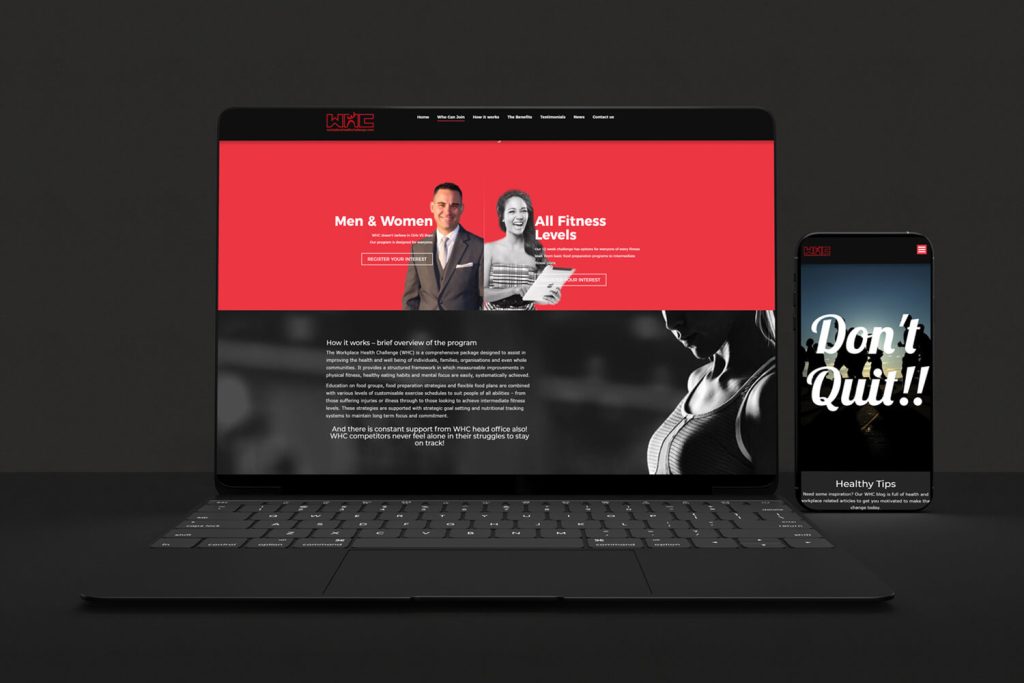
Workplace Health Challenge
A workplace wellbeing platform
We developed a mobile-friendly website for a workplace exercise and wellbeing programme, aligning its structure, identity and participation prompts around the programme.

Austranet Data & Security
Technical services, clearly organised
We organised networking, cabling, Wi-Fi and security services into a responsive website, helping prospective customers understand the services and request an appropriate quotation.
IN OUR CLIENTS’ WORDS
“They delivered ahead of schedule and under budget. It’s rare to find this level of professionalism and creativity together.”
Sofia A. · Boudoir Vestiario
SERVICE AREA
For your audience in Birmingham.
Products and catalogues.
Serving Birmingham can involve customers with different usage patterns. Describe when and how the audience uses the service rather than assuming the city name predicts demand.
Check campaign landing pages and mobile journeys before an announced launch.
The map identifies the audience area. Project scope, collaboration and delivery are agreed around the business and its users; it does not imply a local office.
- Audience and offer
- Questions before an enquiry
- Form and confirmation message
Birmingham
THE NEXT STEP
Start with what your website needs to do.
Send a brief outline of the business and the pages you need. We will help turn that into a practical starting brief.
YOUR NEXT STEP
A website that helps customers take the next step.
Bring one clear objective and the existing setup. We can identify a practical first step and the checks needed to accept it.
Choose the core pages and the visitor action the initial design must support.