
Recommended Services
Supported Scripts
Web Design · Dublin
Web design for online bookings.
Make the first screen clear.
A visitor should understand what they can book, how availability works and what comes next. Design the surrounding content to answer those questions before the form. Choose the core pages and the visitor action the initial design must support.
- Business websites and redesigns
- Designed for mobile, tablet and desktop
- Content and structure you can manage

MORE THAN A GOOD-LOOKING SCREEN
Identity, information
and navigation that belong together.
Visual character matters, but so does the order of information. We build both into the page structure.
A clear message
Put the essential information where a first-time visitor can find it without searching through your entire site.
Intuitive navigation
Connect the overview, detailed service pages and contact options so the visitor can move forward without losing context.
A recognisable identity
Typography, colour and imagery work as a system, with enough flexibility for future pages.
WHAT WE DESIGN
One visual language.
Across the whole website.
We establish reusable page elements so service pages, project examples and contact details stay visually connected.
- Page structure and content hierarchy
- Core page designs and reusable components
- Responsive layouts and navigation checks
- Handover with guidance on managing your content
Business website
Present the company, its services and the evidence that helps a prospective customer decide.
Landing page
A dedicated page for one campaign, with an offer and a clear action.
Website redesign
Keep useful content and replace the structural problems that make the current site hard to navigate.
Project showcase
Give each project enough context for a prospective customer to understand its relevance.
FROM FIRST CONVERSATION TO HANDOVER
Agree the direction.
Then build the detail.
Content and page priorities are agreed before we spend time refining individual visual details.
01
Goals & content
We review the offer, audience and available material, then define what the website must explain.
02
Structure & design
You see the proposed structure and design direction before the full build begins.
03
Build & testing
Approved designs become responsive pages, with functional checks along the way.
04
Handover & continuity
We review the finished pages together and explain how your team can maintain the content.
DESIGN + DEVELOPMENT
Clear on a phone.
Consistent on a desktop.
- Consistent buttons, forms and interaction states
- Readability and basic accessibility checks
- Working links and clear ways to get in touch
A FOUNDATION YOU CAN MANAGE
A website you can keep current.
We explain which areas you can update yourself and where a structural change needs development work.
Online payments, specialist forms and external integrations are scoped separately so requirements and costs stay clear.
BEFORE WE BEGIN
Your first questions, answered.
Start with the service, the visitor’s main question and the action they need. A clear first screen helps orientation; supporting detail can follow in a readable sequence.
No. A design project can use a suitable existing system. Custom rules and integrations need their own technical scope; the interface should reflect the system that will actually be used.
Yes. It can guide visitors to a qualified enquiry or quote request. Decide that purpose early so product information and calls to action support the actual sales process.
Only where those screens are in the agreed scope. Identify the relevant roles and states before design begins so the handover covers the journeys the application needs.
That can expose avoidable layout problems. Use representative translated content while designing, especially for navigation, headings and buttons, and have the wording reviewed by an appropriate language owner.
A PRACTICAL STARTING POINT
Refresh the design while retaining useful structure.
A redesign should address the confusing parts without discarding useful content and established journeys. Map what is retained before changing navigation.
01 · Prepare
Identify what already works, where people get stuck and which URLs or records must survive the change.
02 · Verify
Compare the old and new journey using the same tasks. Check retained information and the transition path.
03 · Keep ownership clear
Keep a record of changed behaviour, the people affected and the process for subsequent corrections.
Illustrative sequence. The actual configuration and responsibilities follow the agreed requirements.
DELIVERY & OWNERSHIP
Make future changes part of the original discussion.
Identify the settings, content or software that are likely to change. Include the people, licences and documentation needed to keep those changes manageable.
01 · Prepare
Make content editing and future page additions understandable at design handover.
02 · Verify
Ask the site owner to make a representative content change without disturbing the agreed hierarchy or navigation.
03 · Keep ownership clear
Provide an understandable editing handover and a process for changes that need additional design work.
OUR WORK
Design put into practice.
Different businesses. Specific requirements.
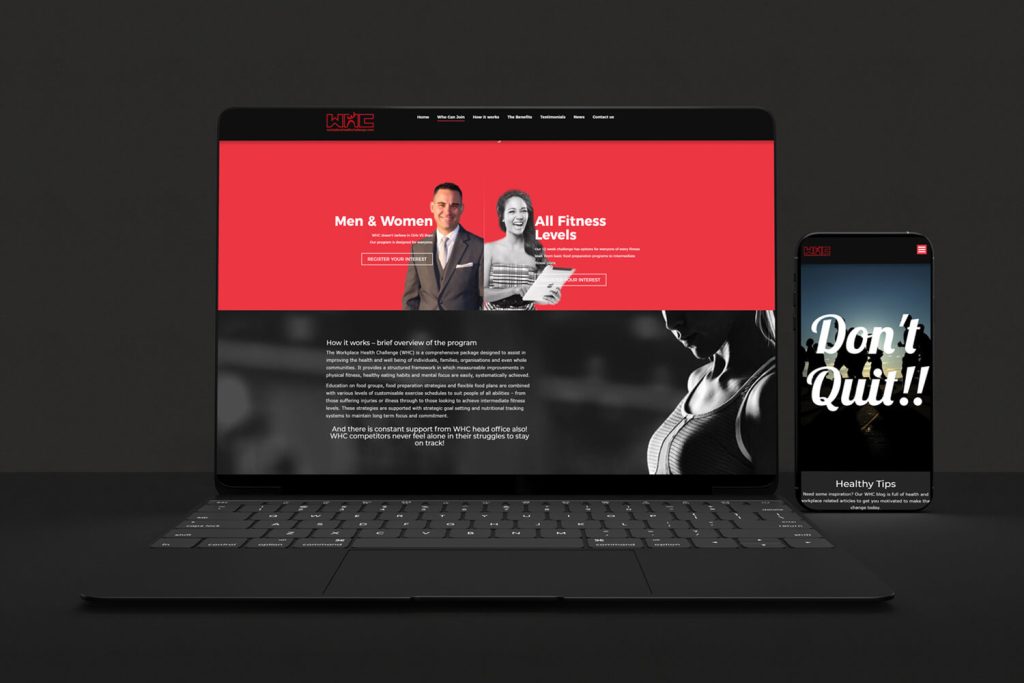
Workplace Health Challenge
A workplace wellbeing platform
We developed a mobile-friendly website for a workplace exercise and wellbeing programme, aligning its structure, identity and participation prompts around the programme.

Austranet Data & Security
Technical services, clearly organised
We organised networking, cabling, Wi-Fi and security services into a responsive website, helping prospective customers understand the services and request an appropriate quotation.
IN OUR CLIENTS’ WORDS
“We could not ask for a more dependable partner to help us navigate the ever changing on-line landscape within our field and offer our customers the most user friendly experience possible.”
Ben S. · Classic Arabian Company
SERVICE AREA
For your audience in Dublin.
Bookings.
The audience area does not describe the entire system. For work serving Dublin, also identify existing providers, external tools and other users affected by a change.
Retain useful content, recognisable navigation and important existing URLs in a redesign.
The map identifies the audience area. Project scope, collaboration and delivery are agreed around the business and its users; it does not imply a local office.
- Content to retain
- Navigation problems
- URL continuity
Dublin
THE NEXT STEP
Let’s define your next website.
Share your website address, your services and what you want to improve. We will discuss the scope before proposing the work.
YOUR NEXT STEP
Give the catalogue a structure people can use.
Tell us what is changing, when it matters and what evidence you already have. We can assess the preparation that is actually justified.
Check campaign landing pages and mobile journeys before an announced launch.